| Support Category: Account Related >> Multiple Accounts |
| Specialist Notes: |
Should a Commitee Member (Leadership Lab user) who also has an Officiating Development Hub account choose to not merge the accounts, the Administrators will adjust their Commitee Member Account username so that they're able to log in successfully. Please user the SR below once the Administrators confirm that the username has been adjusted for the Committee Member account.
Please note that this SR only applies to users with Official and Committee Member accounts who choose not to merge. Please refer to Multiple Active Accounts | Ticket Level - Start Here SR for more information.
| Standard Response: |
Thank you for your patience while we provide an update!
The USTA Officiating Development Hub Administrators have provided an update to your ticket. Kindly note you will now be able to log in by following the steps below:
To log in to your USTA LeadershipLab Committee account, please do the following: 2. Enter your username and password:
|
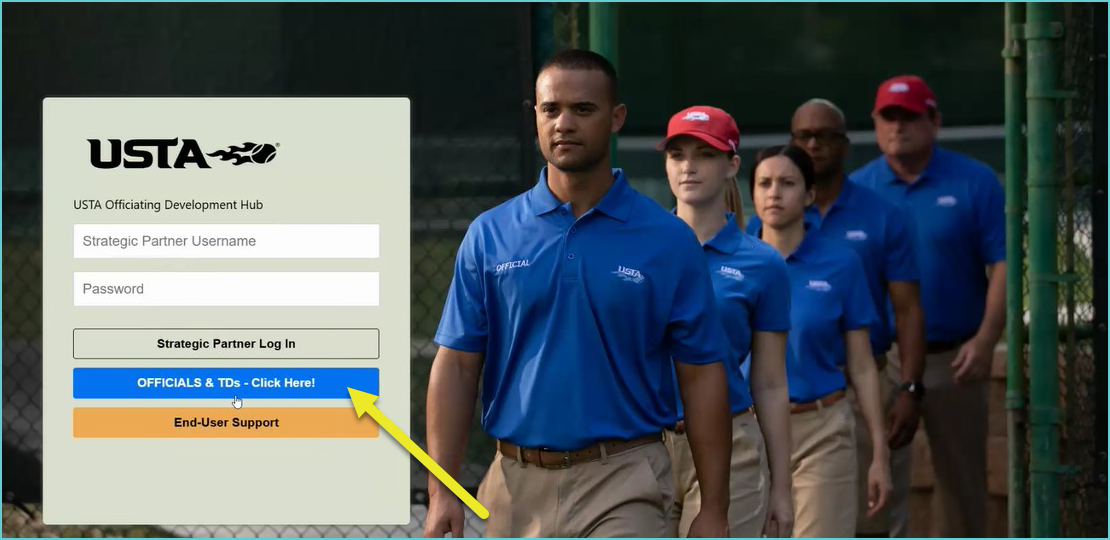
To log in to your USTA Officiating Development Hub account, please do the following: 2. Click on the blue "OFFICIALS & TDs - Click here!" button.
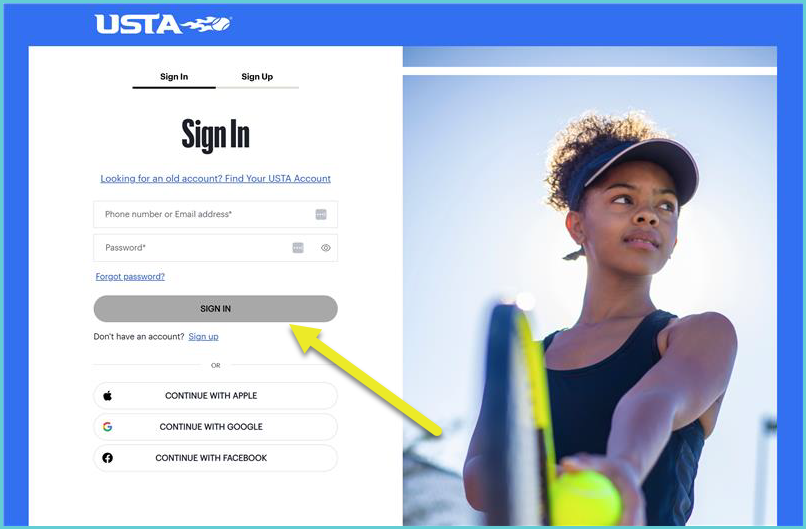
3. Enter your USTA.com account credentials and click Sign In. Tip: These are the same credentials you will use for your OfficialsFirst account |
Please let us know if you're able to successfully log into your accounts. We look forward to your response and assisting you further. In the meantime, have a pleasant day!
