| Support Category: LMS Navigation |
| Specialist Notes: |
Please provide the SR below, should a National Staff user need assistance browsing or searching for learning.
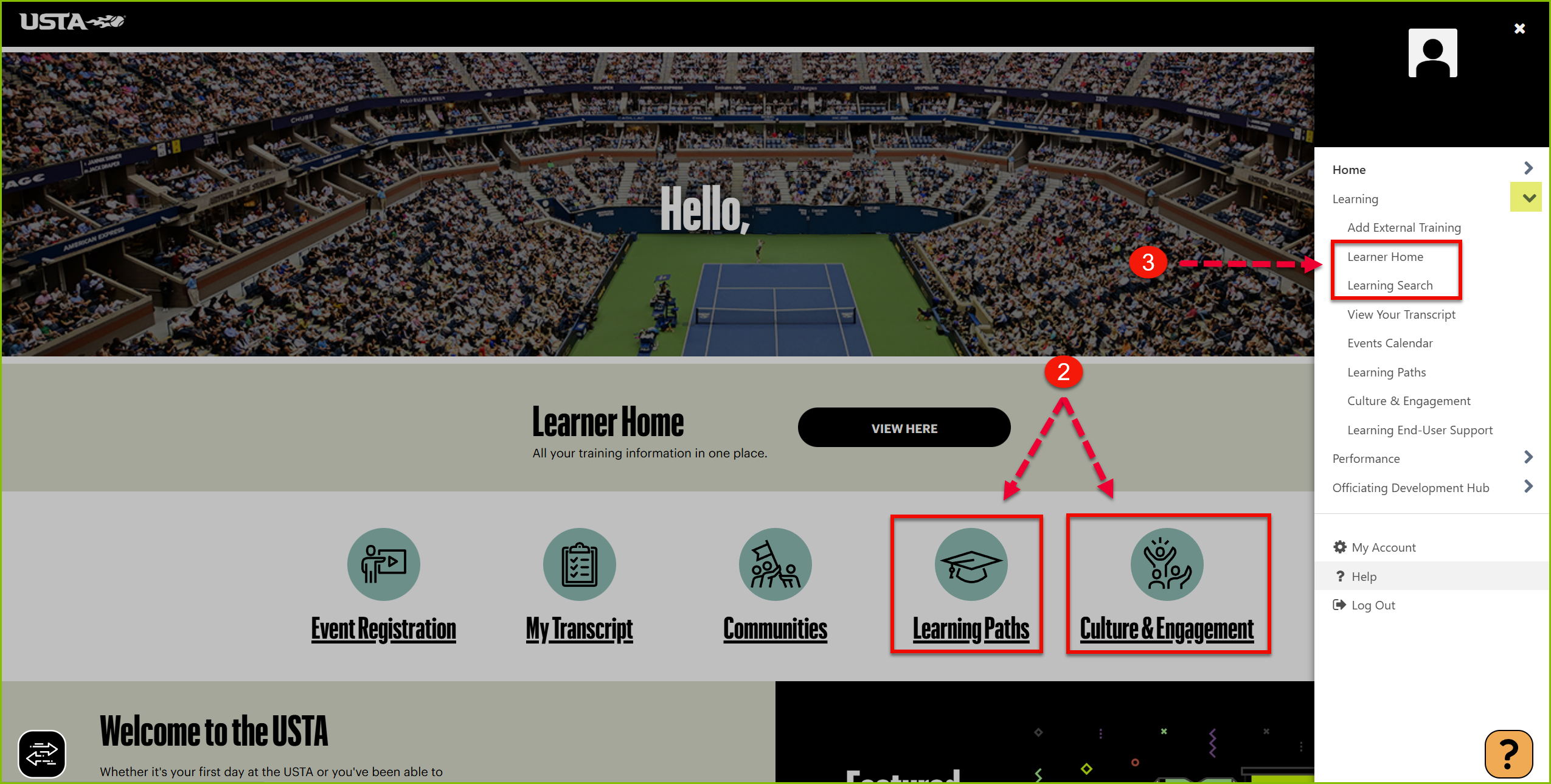
When users ask how to browse learning, please remind them that the Learning & Development team has created curated Learning Paths for USTA Staff. These Learning Paths are available from the Icon Bar on the homepage and are the recommended way to explore learning by topic.
- If the user is unable to locate a course through Learning Paths, they may also use Learning Search via the hamburger menu or Learner Home from the main homepage.
- If the user mentions they're looking for an assigned training, please assist them with locating their transcript instead.
IMPORTANT!
|
| Standard Response: |
You may search or browse available learning by doing the following:
1. Click the 'GO TO LEARNING' button from the welcome page.
2. From the home page, explore the Learning Paths and Culture & Engagement sections. These sections allow you to browse training by topic and were curated by the Learning & Development team.
3. If you’re looking for a specific course, click the hamburger menu (☰) in the top-right corner and select 'Learning Search' under Learning, or via the 'Learner Home' option.
Kindly note that if you're looking for a training that was assigned to you, you will find it by clicking the 'My Transcript' link under the Clipboard icon instead.
