| Support Category: SSO |
| Specialist Notes: |
Login URL: https://usta.com/leadershiplab
Full URL: https://usta.csod.com/login/render.aspx?id=ustanational (We may provide this URL if the above link is not working)
The National Staff accesses Leadership Lab via SSO with their Google accounts (@usta.com). Please provide the SR below to assist with SSO. Part-Time (P/T) employees with an @usta.com email address also use SSO.
If the user replies stating they still can't log in, kindly create a ticket and escalate it to the USTA Leadership Lab Admins.
IMPORTANT! Before providing the SR below, please refer to the 'User Types' KB article to ensure the user is National Staff. For National Staff, it will say: USTA National Staff (USTA Structure) under identifier column - see the below screenshot.
Note: We are permitted to reset passwords for P/T employees who do not have an @usta.com email address. |

| Canned Response Code: /USTALab01 |
| Standard Response: |
In order to successfully log in, as National Staff, please visit https://usta.com/leadershiplab and follow the steps below accordingly:
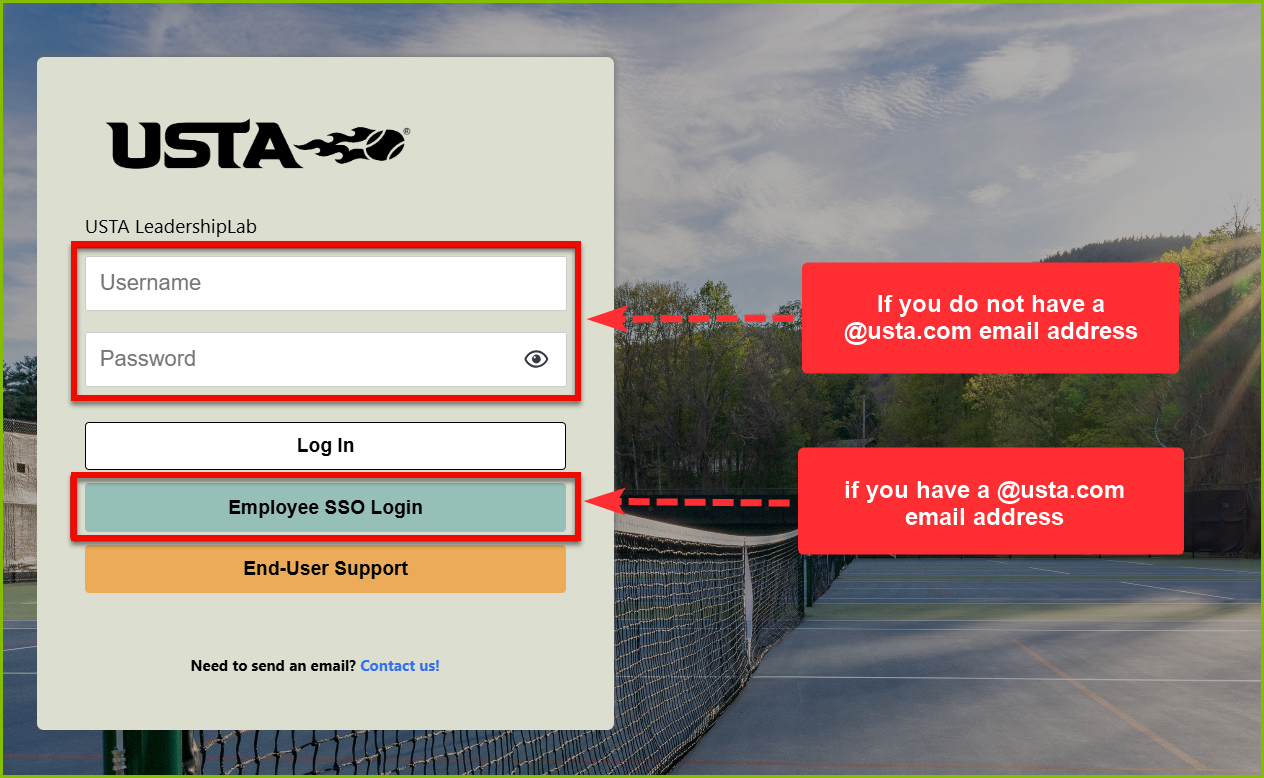
Full-Time Employee: Please make sure you’re signed in to your USTA Google/Gmail account, then click the 'Employee SSO Login' button. You should be logged in automatically.
Part-Time Employee: If you have a @usta.com email address, please follow the same steps outlined above for Full-Time employees. If you do not have a @usta.com email address, enter your Username and Password, then click the 'Log In' button.
In the event you're still unable to log in, please let me know, and I will create a ticket so we can escalate the issue to the USTA Leadership Lab Administrators for further assistance/processing. For the ticket, kindly provide any error messages you may be experiencing.
